7 Tips for Buying a 3D Printer
Buying a 3D printer is less about chasing the biggest number on a spec sheet and more about matching a machine to real projects. Adrian Bowyer, founder of the RepRap project, has championed accessible printers capable of reproducing some of their own parts. That idea points to a useful buying question: can you maintain and repair the printer after the first excitement fades? Small details matter. Check build volume against objects you actually plan to make, not imaginary future projects. Compare filament compatibility, replacement-part access, software, noise, and the support available to beginners. A low price can look appealing. It may also mean more setup, troubleshooting, or upgrades than expected.
This guide introduces seven practical checks for choosing a 3d Printer Printer, from print technology and material needs to safety features and ongoing costs. Look closely at sample prints, too: inspect fine lettering, curved edges, and the underside of a small test object. Those details reveal more than a glossy product photo. Consider how much tuning you are willing to do. Some buyers enjoy adjusting belts and settings; others want a dependable machine that works after setup. Neither preference is wrong. I would be cautious about promising perfect prints from any model, because results depend on materials, settings, and maintenance. That caveat matters. The best choice is not automatically the fastest or most expensive printer. It is the one whose limits, upkeep, and capabilities make sense for your workspace and patience.
Define Your Printing Goals and Choose Suitable Materials
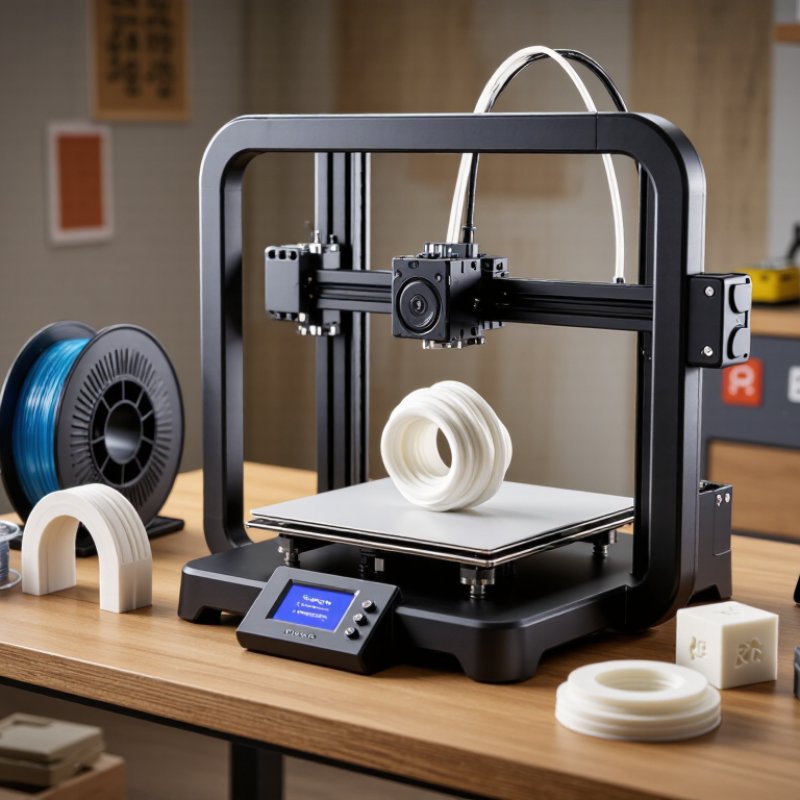
Before comparing printer specifications, define what you plan to make. A small desk organizer has different needs from a flexible phone stand or a detailed miniature. Note the object’s size, surface finish, strength, and whether it must bend. These details help you choose a printer and material for real projects, not just impressive sample photos.
Tip: Choose one likely project and research its material needs. PLA is often a manageable starting point for indoor prototypes. PETG can suit parts that need more toughness, while flexible filament requires compatible printer settings and careful feeding. Check the printer’s stated material compatibility, build volume, and temperature limits before buying.
Think about where the printer will sit, too. A material’s odor, ventilation needs, and storage requirements can affect whether it fits your workspace. Keep filament dry; moisture can cause rough surfaces and uneven extrusion. I’d avoid buying several material types at once. It sounds efficient, but unused spools may age before you learn their quirks. Start with one material, print a simple test, and adjust settings gradually. A little trial and error is normal.
7 Tips for Buying a 3D Printer – Define Your Printing Goals and Choose Suitable Materials
| Tip |
Printing Goal |
Suitable Material |
What to Check Before Buying |
| 1 |
Make inexpensive concept models and everyday household prints. |
PLA |
Check that the printer supports 1.75 mm or 2.85 mm filament, as applicable. PLA is easy to print, but it can soften in high heat and is not ideal for parts exposed to hot environments. |
| 2 |
Create functional parts that need more toughness or modest moisture resistance. |
PETG |
Look for a heated bed and a hot end rated for the material’s recommended printing temperature. PETG can be stringy, so reliable temperature control and adjustable print settings are useful. |
| 3 |
Print outdoor parts that need better weather and UV resistance. |
ASA |
Choose a printer with an enclosure or a compatible enclosure option. ASA can warp and may release fumes during printing, so use suitable ventilation and follow the material safety guidance. |
| 4 |
Produce flexible items such as grips, bumpers, seals, or wearable accessories. |
TPU |
Check whether the printer’s filament path can handle flexible material. A direct-drive extruder often feeds TPU more reliably than a long, unsupported filament path. |
| 5 |
Make durable engineering parts that may experience repeated stress. |
Nylon |
Confirm that the printer can reach the required nozzle and bed temperatures. Nylon readily absorbs moisture, so plan for dry filament storage; an enclosure can also help reduce warping. |
| 6 |
Print small objects with fine surface detail, such as miniatures or intricate decorative pieces. |
Photopolymer resin |
Consider a resin-based printer with suitable XY resolution and build volume. Resin requires careful handling, washing, and UV curing; include space and equipment for these post-processing steps. |
| 7 |
Print large prototypes or parts in one piece with a straightforward workflow. |
PLA or PETG, depending on the part’s intended use |
Compare the usable build volume with your largest planned model. Also check bed leveling, replacement-part availability, and whether the printer’s supported materials match your performance requirements. |
Compare Printer Types and Their Strengths
Fused-filament printers suit sturdy prototypes, brackets, and larger parts with modest equipment costs. Their trade-off is visible layer lines, especially on curved surfaces. Vat photopolymerization captures tiny lettering and smooth details, but parts need washing and post-curing. Powder-bed fusion can produce complex, interlocking nylon parts without support structures; it usually requires more space, investment, and careful powder handling. ISO/ASTM 52900 provides standard terminology for these additive-manufacturing process families.
Tip 1: Match the process to the part, not the trend. Sketch the smallest feature, expected load, and finish you need.
Tip 2: Check the whole workflow. A detailed resin print may look excellent, yet washing and curing can take more bench space than expected. Test a sample before committing. Small details matter.
Wohlers Report 2024 estimated that the global additive-manufacturing industry reached $20.035 billion in 2023, growing 11.1% from 2022. That figure covers a broad industry, not just desktop printers, so it cannot tell you which machine is best for your project.
Tip 3: Compare total costs, including materials, failed prints, ventilation, and maintenance. Then ask a local service bureau to print the same test part in different materials. Hands-on comparison beats a glossy specification sheet. I still find surface finish hard to judge from photos.
Evaluate Software, Ease of Use, and Ongoing Costs
Tip 1: Evaluate the software with a real model, not a polished demo. Import a small sample file, rotate it, add supports, and preview each layer. Check whether the slicer explains errors clearly and saves settings you can reuse. If every adjustment feels buried, printing can become a software chore. Test the workflow. A free slicer is not automatically simple.
Tip 2: Judge ease of use by setup and recovery, not the product page. Look for clear leveling steps, accessible nozzle changes, and a way to pause a job safely. A printer that needs frequent manual tuning may suit a patient hobbyist but frustrate a shared workspace. Ask how often routine cleaning is needed. Small details matter. Read the maintenance guide before buying; I sometimes overlook that step.
Tip 3: Estimate ongoing costs before choosing a printer. Include filament, replacement build surfaces, nozzles, and failed prints in your budget. A low purchase price can hide recurring costs, especially when calibration wastes material. Check whether common parts are easy to source and whether the printer accepts standard materials. Keep a small reserve for wear items. You may not need every accessory at once. I would leave room for surprises, because real print schedules rarely match optimistic estimates.
Review Safety Features, Warranty, and Customer Support
A printer’s safety features are easiest to judge before it is running. Look for a stable frame, guarded hot components, and clear instructions for clearing jams. For enclosed models, check whether the door interlock pauses motion when opened. Confirm that the manual explains ventilation and safe placement, especially if the machine will sit in a small room. These details matter.
A long warranty is not automatically a useful one. Check its coverage period, exclusions, and whether labor, shipping, or replacement parts are included. Nozzle wear and build surfaces may be treated as consumables, so verify this in writing. Ask what happens if a repair takes weeks; downtime can matter more than the warranty headline. Keep records. Save the receipt, plus photos of the setup and any fault messages.
Test customer support before buying, not only after a problem appears. Send one specific question about setup or maintenance, then note how quickly and clearly the team replies. Search the help center for step-by-step guides, troubleshooting diagrams, and downloadable manuals. A vague answer is a warning sign. Expect to troubleshoot a little yourself. Calibration can take longer than expected, even with good instructions.
7 Tips for Buying a 3D Printer
Review safety features, warranty terms, customer support, and other essentials before choosing a printer.
How to read this chart: Bars count the suggested questions listed for each topic. They are checklist counts—not product ratings or market statistics.
- Safety features (3): Check for guards or an enclosure, electrical safety information, and ventilation guidance.
- Warranty (2): Confirm the warranty period and which parts or issues are excluded.
- Customer support (2): Check available support channels and where setup or troubleshooting resources are provided.
- Materials (2): Confirm supported filament types and their temperature requirements.
- Build volume (1): Compare the stated build dimensions with the objects you plan to print.
- Maintenance (2): Check which parts may need replacement and what routine upkeep is required.
- Total cost (2): Include consumables and any delivery costs in your budget.